
AI Knowledge Hub
On this page
The AI Knowledge Hub is your centralized repository for all AI-driven analyses in Grower. It stores and organizes insights at both the Campaign Group and Group levels, helping you make smarter, data-informed decisions without having to hunt through multiple reports.
The hub is available in two locations:
- Campaign Group level — accessed via the AI Hub tab on the Performance page of a Campaign Group
- Group level — accessed via the Reporting page of a Group
Accessing the AI Knowledge Hub
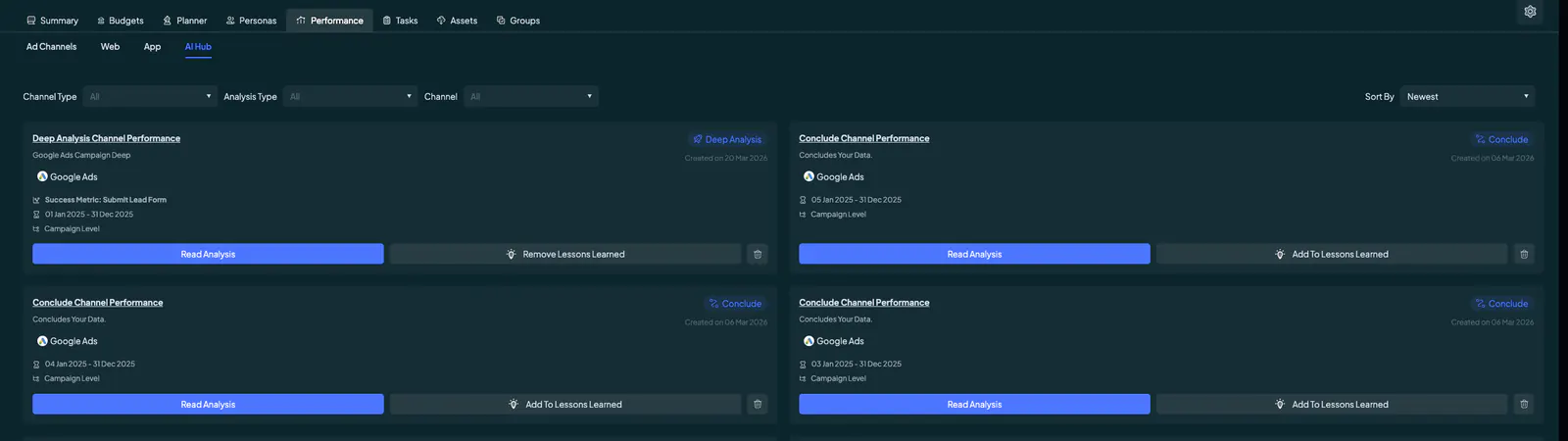
To open the hub at the Campaign Group level, navigate to your Campaign Group and select the Performance page. Click the AI Hub tab alongside Ad Channels, Web, and App.
At the Group level, navigate to the Reporting page of your Group and scroll down to find the hub.
Filtering and Sorting Analyses
Three filters at the top of the hub let you quickly narrow down the analyses displayed:
- Channel Type — Filter by channel category: Ads Channel, Web Performance, or App Performance.
- Analysis Type — Filter by the kind of analysis: General Analysis, Deep Analysis, or Group Analysis.
- Channel — Filter by a specific channel such as Google Ads, Meta Ads, LinkedIn Ads, TikTok Ads, Snapchat Ads, Google Analytics, or Adjust.
Use the Sort By control in the top right to order results by Newest or Oldest.
Understanding Analysis Cards
Each analysis is displayed as a card showing key details at a glance: the analysis name and type, a brief description, the channel, success metric (where applicable), date range, level, and creation date.
To view the full results of any analysis, click the Read Analysis button on the card. This opens a detailed report with predictive insights, performance metrics, and strategic recommendations.
Saving to Lessons Learned
You can flag any analysis as a key finding by clicking Add To Lessons Learned on the card. This stores the insight in a dedicated space you can return to at any time — ideal for building a library of successful strategies and best practices for future campaigns.
To remove a saved entry, click Remove From Lessons Learned on the same card.
Deleting an Analysis
To delete an analysis, click the trash icon on the card and confirm the deletion in the popup that appears. If the analysis has been saved as a Lesson Learned, you will be given the option to delete only the analysis (keeping the Lessons Learned entry) or to delete both.
Deletions are permanent — review carefully before confirming.
Analysis Types Explained
General Analysis
Run at the channel level within a Campaign Group. General Analysis offers two modes:
- Analyze — Analyzes your channel data to surface trends, patterns, and performance insights.
- Conclude — Draws conclusions from your data, summarizing key takeaways and outcomes.
Deep Analysis
Deep Analysis provides granular, campaign-level insights across five types. These are available regardless of whether you are working within a Campaign Group or a specific Group.
All five Deep Analysis types are available at three levels for ad channels:
- Campaign level
- Ad Group / Ad Set level
- Ad level
The five types are:
- General Deep Analysis — A broad deep-dive into overall campaign performance. This is also the only Deep Analysis type available for Adjust (found under the App tab in the Performance module).
- Content Analysis — Evaluates the performance of your creative and messaging.
- Budget Analysis — Assesses how your budget is being allocated and where optimizations can be made.
- Audience Analysis — Examines audience targeting and engagement to identify top-performing segments.
- Conversion Analysis — Focuses on conversion performance, tracking how effectively campaigns drive desired actions.
Group Analysis
Run at the channel level within a specific Group using the Analyze Group option. Group Analysis provides a high-level view of performance across all campaigns in the Group, giving you a broad strategic perspective that is not tied to any individual campaign.
Benefits of the AI Knowledge Hub
- Centralized insights: All AI analyses are stored in one place, giving you a single reference point for data-driven decisions.
- Strategic learning: The Lessons Learned feature helps you compile best practices and build a knowledge base to guide future campaigns.
- Easy navigation: Filters and sort controls let you find the right analysis quickly without scrolling through unrelated results.